


Project:
Cover image source: Public Domain Image Archive Infinity View
Introduction
I am a free and open source software advocate and user. Whenever I can pick a software to use, I prefer it if it's an open source software, ideally written in a programming language that I can understand because it instills a certain level of confidence in not being locked out of using it in the future. Sometimes you have no choice but to use proprietary software, especially if it's an industry standard. Think Photoshop or Figma in the design software world. But other than those exceptions, when I can, I go out of my way to find a FOSS equivalent software to use.
It's because of this reason that I surprised myself a few years ago when after having tried many personal note taking applications (notepad, evernote, notion, roam, obsidian, google doc, nuclino etc) I eventually settled on Obsidian and have been happy user. Unlike a lot of other note taking apps, the one big draw of obsidian is that it stores notes in files as opposed to databases. So even if you don’t have obsidian installed, you can open those notes in another text editor and proceed with your work. And if the obsidian company were to shut down tomorrow, my notes won’t be locked in their servers and databases but would be right with me on my machine, usable via normal text editors. The other reason that worked in its favour is that the text file stores data in two data formats - markdown (for text) and frontmatter (for metadata), both are fairly standard and well understood languages. Which means that you can always find other softwares that you can use to view, process or publish them. So while obsidian has their own paid support to generate webpages from your notes, I don’t have to use it. I instead prefer using quartz which works well with the markdown+yaml files created by obsidian. Similarly, while obsidian provides paid features to store your notes on cloud, I didn’t care for that product and was happy using github to back up my notes. I could have just as easily chosen google drive or dropbox for it. I recently came across this research project called Cosma that can be used to do network synthesis between your notes to find how your ideas link to other ideas. A lot of this flexibility comes to Obsidian despite it being a closed source software because it stores and exports files in open standards like markdown and frontmatter. Open Standards help create software that can be developed or used autonomously while also being interoperable with each other.
This is a need felt very acutely in social software: where you want different types of communities to coordinate or collaborate on each others work occasionally but also work independently for the most part. Similar ideas like these show up now in discussions about alternative social media platforms like fediverse, bluesky etc. A community that has understood this well and been doing this for some time now are the archivists, who have created and used standard data formats and software implementing those to be able to effectively work together as a global community.
When we got the opportunity to work with Venkat and Ojas from NCBS on an annotation software for archival records, we were really excited for the possibilities of learning about these standards and working with this community. It would also serve as fodder for the work we want to do with decentralized software for addressing online harms on social media.
Introducing Anno.Milli
The project is cheekily titled anno.milli by the NCBS team and is in its 1.0 version now. It is an annotation software where you can import archival collections from one archive, add annotations to them and export the collections for the same or other archives.
The archives at NCBS collects and preserves primary material on the history of science in contemporary India. Its holdings include more than 350,000 processed items across 50+ collections, paper manuscripts, negatives and photographs, books and fine art, audio recordings, scientific instruments, correspondence, and field and lab notebooks, making it a vital resource for researchers and enthusiasts alike1. The Archives at NCBS is heavily involved in the Milli Archives Foundation, a non-profit network of archives and archivists dedicated to the creation, maintenance, and preservation of archives throughout India.
Anno-Milli is introduced as a way to annotate the digital archival objects hosted on The Milli Archives platform. The Encoded Archival Descriptions (EAD), more on this in the later section, that are hosted on the NCBS archival space, can be imported into the Anno Milli platform as well. Users can then search and explore these archive files and annotate them.
Technical Details
What is Encoded Archival Description (EAD)?
Encoded Archival Description (EAD) is an XML-based standard used by archives to structure and share detailed finding aids online. It provides a consistent way to describe collections, their context, creators, scope, and individual components, enabling researchers to navigate complex archival materials more easily. By using EAD, institutions can make their holdings searchable, interoperable, and readable across different systems, improving long-term accessibility and preservation.
Basically, you can think of it as a very detailed map where each location has a lot of metadata information associated with it, which can be used by any archivist, researcher, or enthusiast to navigate or explore through all the archival collections and objects. There can be direct links to a digitally hosted object ( a scanned file, an audio, or any other digital media), or descriptions of the physical spaces where a physical object ( documents, photos, etc.) is kept.
In the context of digital objects, an EAD can serve as a complete resource to explore an entire digital object. One can review its metadata, like descriptions provided by archivists, subjects, and tags associated with it, about the languages used, about the terms and conditions, and so on, and view the digital object itself. For example, in this archival description page of a digital archival object file, you can view all its details on this page, and can access the digital file itself as well.
This serves as a great opportunity to allow users to not only access these resources but also enrich their descriptions with further information. This could include additional metadata like associated subjects or compelling facts and stories related to the archival object. This goal is the driving force behind the Anno-Milli project.
Broad Structure of an EAD XML
In an Encoded Archival Description, archival material is arranged as a clear hierarchy that moves from the broad to the specific. At the top is the overall collection, which may be divided into series and sub-series based on how the material was created or used. These groupings contain files, which are often the smallest unit of description and may represent a single folder or set of related documents. A file-level description typically holds all essential information about the archival object and can include links to digitized material, allowing readers to understand both the context of a collection and how to access individual records. The concept of annotation would apply to these file-level descriptions.
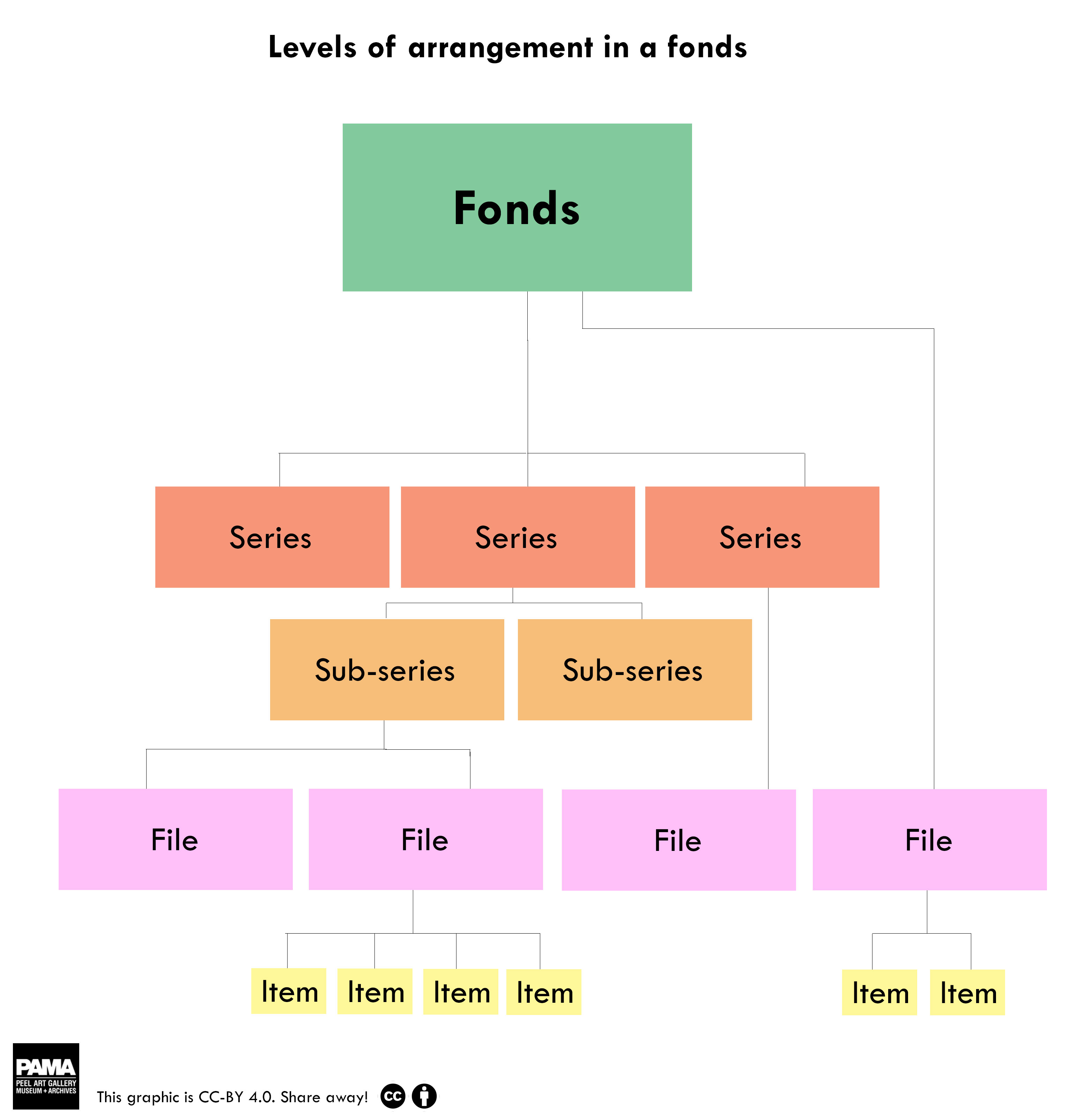
A flow-chart showing EAD hierarchy. "Fonds" is another term for "Collection".
Source: Peel Archives Blog
Current User Flows in Anno-Milli
The Anno-Milli platform, accessible at “anno.milli.link”, serves as an annotation tool for the EAD content (specifically files) stored in the “cat.milli” archival space. The EAD XMLs that are hosted on the Milli Archival space can be imported by the Admins on Anno-Milli as well. The platform is designed to extract detailed information about file-level entities, along with foundational details about collections, series, and sub-series.
The users can search the files based on all the related information, like unitid, subjects, descriptions, digital object links, collection name, or any approved annotations that were added to a file. A file page displays all the metadata that is present for that file. We can see a digital object viewer at the top (if there is any digital object information present for that file), through which users can read through the high-definition file scans, and can browse through the file pages (if any). At the bottom of the file, users can see the featured annotations for that file. The file pages are public and can be viewed by anyone without any registration.
The file pages in Anno-Milli can also be accessed directly from the Milli archival space. Each file-level page in the archival space includes a link to the corresponding file in Anno-Milli, which opens its dedicated file display page there.
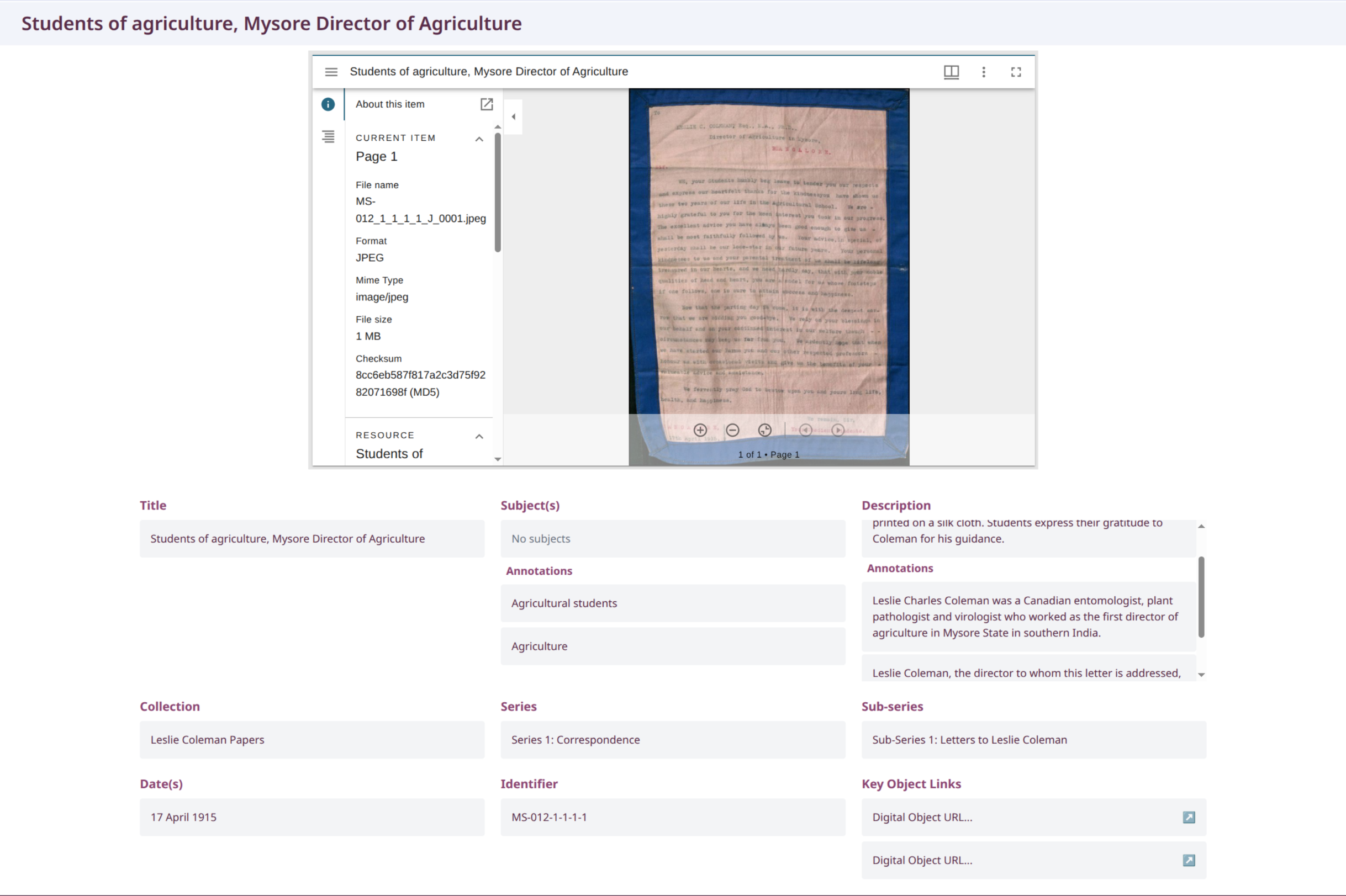
Sample anno.milli file display page showing the digital object viewer and file's metadata.
Logged-in users have access to an "Add Annotations" option, situated below the featured annotations. Selecting this option opens a form that allows users to submit two types of annotations: a description annotation or a subjects-annotation.
A subjects-annotation can contain one or more subjects. Users can find subjects by searching the backend for terms from the Library of Congress Subject Headings (LCSH)2 vocabulary or from local, in-app-generated subjects. Additionally, users can submit custom subjects if they cannot find a suitable existing one.
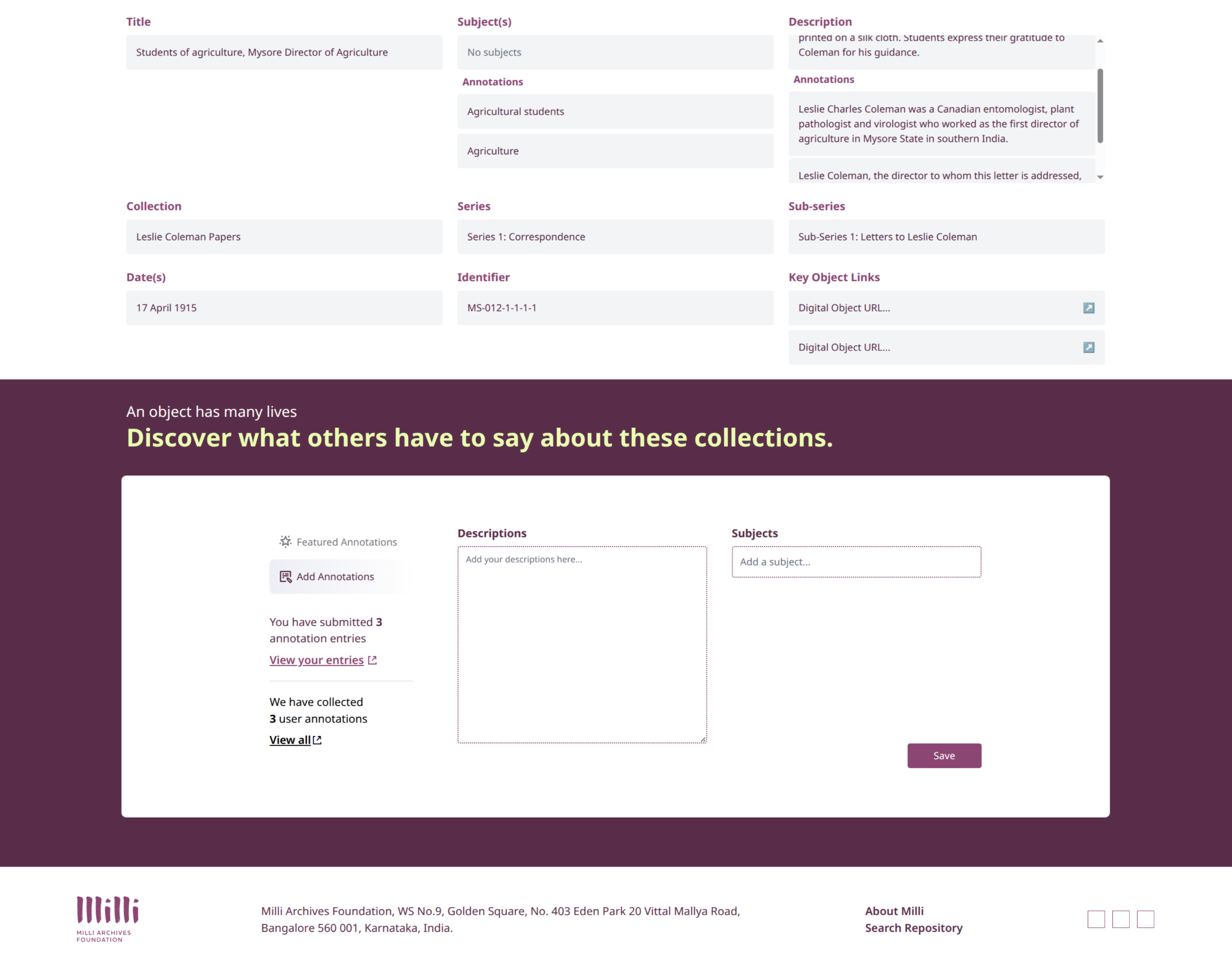
Annotation Section on the File's Display page.
The Admins then review these annotations. If an annotation is approved, it is then added to the file display page and to the list of approved annotations for that file that is publicly visible. If a subjects-annotation contains a custom subject, on approval, the subject is added to the app’s local subjects library and is searchable when adding new subject-annotations as well.
To get the updated EAD XML file back with approved annotations, the Admins can export the updated files. These updated XML files can then be imported into the archival spaces to get the updated data that can be used accordingly.
Additional features underway
-
The feature for submitting Agents-Annotations. Much like the Subjects-Annotations, this will allow users to search the Library of Congress Name Authority File (LCNAF)3 vocabulary to find and submit relevant name annotations.
-
The feature for submitting Affect-Annotations, where users would be able to share how they feel about a given archival file, and see other users' submitted responses as well.
-
Implementing industry-standard protocols to set up standard communication between the Anno-Milli app and the archival spaces to sync data from both ends.
This project was an opportunity to work with a new team on some ideas that are very aligned with our work. We are really excited about the possibilities of other archives using anno.milli